
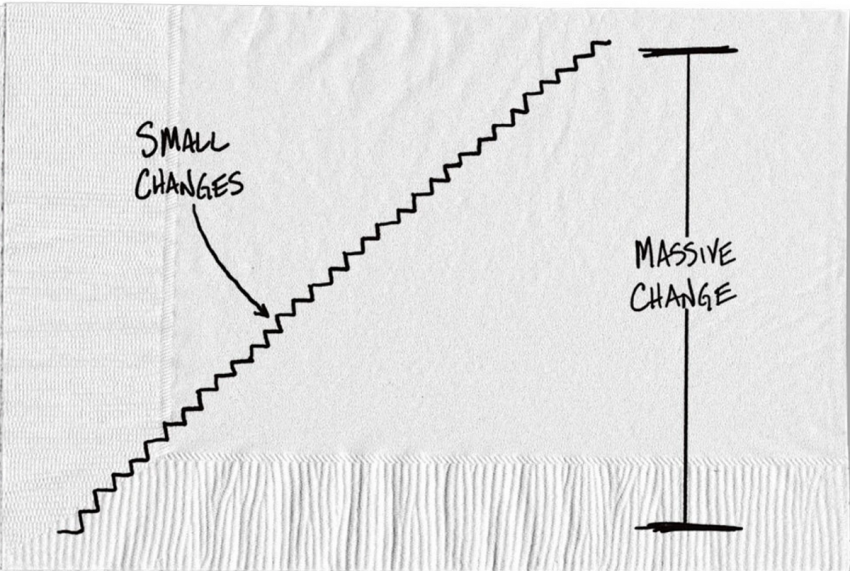
You signed up for a free trial of a streaming service to watch one show. You added cloud storage when your phone filled up. A meditation app, a news site, a fitness class with a monthly membership you meant to pause. None of them felt expensive on its own, which is exactly why you stopped noticing them.
That's subscription creep. It doesn't show up as one big hit to your budget. It shows up as a checking account that always seems a little lower than it should be, and a vague feeling that you're paying for things you don't use. The fix is not a willpower exercise. It's a one-time audit, done in the right places, followed by a short check a few weeks later to make sure the charges actually stopped.
Why recurring charges are so easy to lose track of
Most recurring charges don't come from one place. Some bill your debit card directly. Some bill a credit card you rarely look at. Some run through Apple or Google, so your statement says “Apple.com/bill” instead of the name of the app. Others go through PayPal, which hides the merchant one layer deeper. And annual renewals are the sneakiest of all, because they show up once a year, long after you forgot you signed up.
So the audit has to cover every place money can leave automatically, not just your main checking account.
The audit: every place a subscription can hide
Set aside about an hour. Pull up the last 12 months, not just the last one, so annual renewals have a chance to appear.
- Every checking account and credit card. Download or scroll the last 12 months of transactions. Search for words like “subscription,” “monthly,” “renew,” “membership,” and “.com.” Many banking apps now have a “recurring payments” or “subscriptions” view; use it, but don't trust it alone, since it often misses annual charges.
- Your phone's app store. On an iPhone, go to Settings, tap your name, then Subscriptions. On Android, open the Google Play Store, tap your profile icon, then Payments and subscriptions. This list shows the real app names behind those vague “Apple” or “Google” charges, including ones you can't find anywhere else.
- PayPal and other payment services. In PayPal, look for the automatic payments section under your account settings. Any merchant listed there can bill you without your card number ever appearing.
- Your email. Search your inbox for “receipt,” “your subscription,” and “renewal.” This catches services billed to an old card or to a family member's account.
Write each one down with three things: the name, the amount, and how often it bills. Convert everything to an annual figure so a $4.99 monthly charge and a $59.99 yearly charge can be compared fairly.
A worked example: what the list usually looks like
Here's a made-up but realistic audit result for one person. Example figures only:
- Streaming service A: $15.49 a month, watched weekly
- Streaming service B: $9.99 a month, last opened in spring
- Cloud storage: $2.99 a month, actively used
- Fitness app: $12.99 a month, opened twice this year
- News site: $79 a year, renewed automatically last March
- Language app: $59.99 a year, forgotten after the first week
The annual math: Streaming B is $9.99 × 12 = $119.88. The fitness app is $12.99 × 12 = $155.88. Add the news site ($79) and the language app ($59.99), and the four services this person barely uses cost $414.75 a year. Streaming A and cloud storage, which they actually use, stay.
Notice what drove that number. It wasn't the big obvious streaming bill. It was two annual renewals and two small monthly charges that each looked harmless. If you're deciding whether to keep something on an annual plan versus monthly, the annual payment discount math is worth running before the next renewal date, since a yearly plan only saves money if you'd really keep it all year.
Canceling cleanly, and what the law actually guarantees
Cancel through the same channel that bills you. App-store subscriptions must be canceled in the app store; deleting the app does nothing. PayPal billing agreements can be canceled in PayPal, but cancel with the merchant too, so they don't try another payment method on file.
You may have heard about the FTC's “click-to-cancel” rule, which would have required cancellation to be as easy as signing up nationwide. It never took effect. The Eighth Circuit vacated the rule in July 2025, days before its compliance date. The FTC opened a new rulemaking with an advance notice in March 2026, but as of October 2026 there's no replacement rule in force. The FTC still brings cases under an older law, the Restore Online Shoppers' Confidence Act, which requires a simple way to stop recurring online charges, but that's enforcement after the fact, not a guarantee you can rely on at the moment you try to cancel.
Some states go further. California's amended automatic renewal law, in effect since July 1, 2025, requires businesses to let customers cancel as easily as they signed up and to send annual reminders. Rules vary a lot by state, so plan for the possibility that a company makes canceling annoying.
That means saving proof matters. Take a screenshot of the cancellation confirmation page, keep the confirmation email, and write down the date. If a company won't let you cancel, or keeps billing after you did, contact your card issuer and dispute the charge, with your proof attached.
Check that the charges actually stopped
Canceling is only half the job. Here's how to confirm it worked:
- Look at the next billing date. For each canceled service, find the date it would have billed next. A few days after that date, check the account it used to hit. You should see no new charge.
- Recheck the app store list. Canceled subscriptions in Apple's or Google's list should show as expired or with an end date, not as active with a renewal date.
- Check again in a year. Annual charges are the ones most likely to slip back in, especially if you re-subscribed during a promotion. A yearly audit, timed to your birthday or the new year, keeps the list short.
If you find you're still overspending after the cleanup, a full 30-day spending audit will show whether subscriptions were really the problem or just the most visible one.
Mistakes that keep the charges coming
- Deleting the app instead of canceling. The app is gone from your phone; the billing isn't. App-store subscriptions keep renewing until you cancel them in the store's settings.
- Only checking one month of statements. You'll catch the monthly charges and miss every annual renewal, which are often the largest line items on the list.
- Canceling without saving proof. If the company keeps billing, a card dispute is much harder to win without a confirmation screenshot or email and a date.
- Trusting the bank's subscription tool as complete. These features are a helpful start but often miss annual charges, PayPal-billed services, and anything on a different card.
- Signing up for new trials with the same card and no reminder. Free trials that convert to paid are where most creep starts. Put a calendar reminder for two days before the trial ends, or avoid trials you don't plan to evaluate. If one-click checkout is part of how these keep slipping in, see how to add friction back to online buying.
Once the dead subscriptions are gone, decide where that money goes. If you want to compare it against other possible cuts, ranking spending cuts by annual dollars helps you see whether subscriptions were your biggest leak or just the easiest one to fix.
Check us out on 📺 You Tube 📺
Check out our Media Section: 📺 Media 📺
#Subscription Creep: Finding and Canceling Recurring Charges You Forgot
Discover more from Grow Beyond Green
Subscribe to get the latest posts sent to your email.